Release Notes

Join our community: Discord Server - Chat with other players, share strategies, and get the latest updates!
April 17, 2026
Section titled “April 17, 2026”Battle performance
Section titled “Battle performance”Fixed a case where looping animation tweens on building capture and production UI could pile up across turns, which could make long matches feel slower until you refreshed the page. Tweens are now stopped cleanly when those indicators are rebuilt.
April 13, 2026
Section titled “April 13, 2026”Auto-place buildings in the Map Editor
Section titled “Auto-place buildings in the Map Editor”The Map Editor now has an Auto-place Buildings panel that automatically positions buildings and starting units on any terrain you’ve drawn or imported.
How to use it:
- Draw or import your terrain (or generate one with the Random Generator)
- Open the Auto-place Buildings section in the right sidebar
- Set the player count, balance mode, and spawn tier
- Click Place Buildings
The generator places Bases for each player, a contested Factory near the center, Cities at strategic midpoints, and – on larger maps – Airfields on flat ground and Seaports along coastlines. All placement respects terrain: buildings only land on passable ground, Seaports sit adjacent to water, and Airfields need flat open land.
Spawn tiers control the strength of each player’s starting units:
| Tier | Starting units |
|---|---|
| T1 | Infantry + basic Armor and Ranged |
| T2 | Infantry + advanced units |
| T3 | Infantry + elite units |
If a faction doesn’t have a unit at the requested tier, the game automatically falls back to the next lower tier.
You can re-roll with a different seed, toggle individual building types on or off, or fine-tune the result by hand afterward. Your terrain is never changed.
April 12, 2026
Section titled “April 12, 2026”Further improvements to the auto map generation + new map
Section titled “Further improvements to the auto map generation + new map”- And many bug fixes and security hardening
Welcome dialog (first login)
Section titled “Welcome dialog (first login)”After you sign in for the first time on a device, a welcome dialog appears with a short orientation: the game is in active development, how to find or create games, and where to go for help.
The dialog highlights:
- Getting Started – quick first steps
- Documentation – full help site
- Discord – fastest way to reach Tomasz (the creator) with questions or ideas
- Release Notes, plus links to Patreon and Ko-fi
Share your expectations (optional): you can open a short survey from the dialog – how you found TinyGenerals, favorite turn-based strategy games, what would bring you back, and a general comment. It is sent the same way as other in-app feedback (to the developer by email). You can dismiss the dialog anytime with Let’s Go!
April 7, 2026
Section titled “April 7, 2026”Account deletion
Section titled “Account deletion”You can now request to delete your TinyGenerals account from the Settings page. Once confirmed, your account is anonymised immediately – username, email, avatar, and bio are scrubbed – and your game history and published maps are preserved under an anonymous name.
You have 14 days to change your mind. A recovery link is included in the confirmation email sent to your address. After 14 days the deletion is permanent.
What stays intact: match history, ELO, and any maps you published remain in the game – they just show an anonymous attribution.
Flood-fill terrain generation
Section titled “Flood-fill terrain generation”The Map Editor’s flood fill tool now has a Generate mode. Instead of painting a flat colour across a region, Generate fills the selected area with procedurally varied terrain – forests, mountains, deserts, swamps, and grassland – all blended naturally with the surrounding landscape.
How to use it:
- Select the Fill tool (or press F)
- Switch the new Paint / Generate toggle in the bottom toolbar to Generate
- Click any contiguous region of the same terrain type
The generator respects buildings and roads already placed in the area – they stay exactly where they are. Each click uses a fresh seed, so you can keep clicking the same region until you get terrain you like, then fine-tune individual hexes by hand.
This is the first step toward richer procedural editing tools in the Map Editor. More generation options are planned for future updates.
April 5, 2026
Section titled “April 5, 2026”Map Editor UI refresh
Section titled “Map Editor UI refresh”The Map Editor top bar has been replaced with a compact floating element in the top-left corner of the canvas – inspired by tools like Spline and Miro. It contains a back button and an inline-editable map name, keeping navigation accessible without eating into canvas space. The full-width bar is gone; user account controls remain in the global header.
April 3, 2026
Section titled “April 3, 2026”Major combat update. Artillery no longer just deletes units – it now acts as battlefield preparation, softening targets for your follow-up forces.
Suppression and split damage
Section titled “Suppression and split damage”Artillery attacks now split their damage into two parts:
- Hard damage reduces HP permanently, just like before
- Suppression temporarily reduces the unit’s effective combat strength for the rest of your turn
For example, a Howitzer hitting an 8 HP infantry might deal 4 hard damage and 4 suppression. The infantry drops to 4 HP permanently, but fights as if it only has 1 HP until the turn ends. Follow up with another unit and that infantry can barely fight back.
Suppression is configured per unit type. Currently Howitzers and Rocket Batteries have a 60% suppression ratio – meaning 60% of their damage converts to suppression, and 40% is permanent. All other units deal pure hard damage as before.
Pinned units can’t counter-attack
Section titled “Pinned units can’t counter-attack”If suppression pushes a unit’s effective strength down to 1 or below, that unit becomes pinned and cannot counter-attack. This means a well-placed artillery barrage can neutralize a defender’s retaliation before your infantry moves in.
Key details:
- Suppression does not affect movement – a suppressed unit can still move at full speed
- Suppression stacks – multiple artillery hits in the same turn accumulate, but effective strength can never drop below 1 from suppression alone
- Suppression clears on turn transition – once all players end their phases, every unit’s suppression resets to zero. It’s a within-turn mechanic only
Visual updates
Section titled “Visual updates”The UI now reflects suppression state clearly:
- Split HP badge: When a unit is suppressed, its health badge shows effective vs suppressed strength (e.g., “1|4” means 1 effective, 4 suppressed)
- Two-stage combat floaties: Artillery hits show both the hard damage (red, e.g., “-4”) and the suppression amount (amber, e.g., “+4 SUP”) as separate floating numbers
- Unit info panel: Selecting a suppressed unit shows the full breakdown – total HP, effective HP, and suppressed amount
Replay support
Section titled “Replay support”Suppression is fully tracked in replay. When watching back a match, you’ll see the same split damage floaties, the same badge changes, and suppression clearing at turn boundaries – exactly as it happened in live play.
Modding
Section titled “Modding”Suppression is fully configurable per unit and per ruleset:
suppression_ratioon any unit type (0.0–1.0) controls the damage splitcan_be_suppressed(default: true) lets you make specific unit types immune to suppressionsuppression_enabledglobal toggle to turn the system on/offpinned_thresholdsets the effective strength at which counter-attacks are disabled
Help site updates
Section titled “Help site updates”Added a new Suppression Mechanics page and updated related guides so core combat behavior is documented consistently across getting started, units, ambush, and replay pages.
March 29, 2026
Section titled “March 29, 2026”Path preview improvements
Section titled “Path preview improvements”When you hover over a destination, each hex along the route highlights in your team color so you can see exactly which tiles the unit will cross. Intermediate hexes show the cumulative movement cost, and the destination displays the total (e.g., “3/5 MP”) so you can tell at a glance whether a move is worth it and where the cost adds up.
Smarter bot attacks
Section titled “Smarter bot attacks”Bot opponents now coordinate when multiple units are near the same enemy. They’ll converge on the same target and focus-fire together. Expect bots to surround and gang up on your high-value units. Defending just got harder.
March 28, 2026
Section titled “March 28, 2026”Units can now move through friendly units
Section titled “Units can now move through friendly units”Previously, your own units could block each other’s paths just like enemy units do. Now your units can path through tiles occupied by friendly units, as long as they don’t stop on them (no stacking). Enemy units still block movement as before. This makes it much easier to maneuver in tight spaces without having to shuffle your whole army around.
Patreon link added
Section titled “Patreon link added”You can now find a link to our Patreon in the header and footer, alongside Discord and Ko-fi.
March 22, 2026
Section titled “March 22, 2026”Two big additions to the battle screen that have been on the list for a while.
Move undo
Section titled “Move undo”Made a bad move? You can now undo your last actions during your turn. An undo button appears in the game dock whenever you have actions to reverse, with a badge showing how many undos you have left.
- Up to 5 undos per turn – move, attack, build, capture, reorder production queue, cancel production. All reversible.
- Full state restore: Undoing rolls back unit positions, health, gold, territories, and production queues to exactly where they were before the action
- Keyboard shortcut: Ctrl+Z (or Cmd+Z on Mac)
- Commit on end turn: Your undo stack resets when you end your turn. Once you pass, your actions are final.
- Mobile: The undo button sits in the dock where the Debug button used to be
Turn-by-turn replay
Section titled “Turn-by-turn replay”You can now replay any match from the beginning, turn by turn. Hit the Replay button in the game dock to open a floating replay panel.
- Playback controls: Play/pause, rewind to start, step back one turn, step forward, skip to end
- Speed selector: 0.5x, 1x, 2x, 4x playback speed
- Timeline slider: Drag to jump to any turn instantly
- Turn counter: Shows current turn out of total turns played
- Fog removed: During replay, fog of war is lifted so you can see the full board state at every point
- Input disabled: Game controls are locked during replay to prevent accidental actions. Live updates pause until you exit.
- Exit anytime: Click X or the Replay button again to return to the live game state
On desktop, the replay panel floats in the bottom-left corner. On mobile, it replaces the dock content.
Bot end-game reactions
Section titled “Bot end-game reactions”Bots now react when a game ends. Winners post victory taunts, losers post defeat reactions, all in the same style as their lobby greeting messages. Classic RTS references and trash talk included (“All your base are belong to us.”, “I blame the map.”, “Unit lost. Unit lost. Unit lost. …yeah.”). Around 27 unique lines for each outcome, delivered as regular chat messages from the bot.
Help site
Section titled “Help site”New documentation pages for Undo Actions and Match Replay added to the Game Mechanics section.
Small update bringing visual eye candy to the map
March 17, 2026
Section titled “March 17, 2026”@Mentions in chat
Section titled “@Mentions in chat”You can now mention other players in chat by typing @ followed by their username. Mentioned players receive a notification in their notification bell, so they won’t miss your message even if they’re in a different game.
- Global chat: Mention anyone on the platform.
- Room/lobby chat: Mention anyone – useful for calling players into your game before it starts.
- Match chat: Mention any player in the match. Only participants can be mentioned during a game. last Mentions are highlighted in chat so they’re easy to spot. If someone mentions you, you’ll see it in your notifications with the message preview and a link to the conversation.
Mention autocomplete
Section titled “Mention autocomplete”No need to remember exact usernames. Type @ and at least two letters and a dropdown will appear with matching players. Press Tab to insert the top match, or keep pressing Tab to cycle through other options. You can also use the arrow keys to navigate and Enter to confirm. Online players show a green dot in the list.
Notification performance
Section titled “Notification performance”Behind the scenes, the notification system is now faster for players with lots of notifications. Loading your notification list and cleaning up old entries should feel snappier.
Quality of life fixes
Section titled “Quality of life fixes”Broke and fixed dock and panels on mobile
March 16, 2026
Section titled “March 16, 2026”Small fixes and improvements:
- Refactored: The right side panel is no longer blocking game on desktop and mobile
- AI is aware of the terrain bonuses
- Production queue cancel fix: Canceling a specific queue entry now correctly removes that entry instead of always removing the first one. The backend properly targets entries by ID, and the UI updates correctly.
- Small fixes here and there
- Significant rewrite of help documentation –> updated to match the current implementation and made more readable for everyday players
March 14, 2026
Section titled “March 14, 2026”Terrain combat bonuses (preview)
Section titled “Terrain combat bonuses (preview)”The groundwork for terrain-based combat modifiers is now in place. Every terrain type can define defense bonuses, which reduce incoming damage, and attack bonuses, which increase outgoing damage. Buildings can also provide defense bonuses that combine with terrain according to the active ruleset.
Current default values make forests and mountains more defensible, roads and shallow water more exposed, and buildings protective. Future entrenchment or artillery/air cover will be modeled as explicit mechanics rather than as terrain fields.
Ambush attacks now use the same bonus system internally. The +25% ambush bonus is preserved but is now configurable per ruleset, and will eventually stack with terrain attack bonuses for ambushers in favorable terrain.
Production queue overhaul
Section titled “Production queue overhaul”The building production system received a major upgrade, making it much easier to plan your army ahead of time.
Queue units without gold: You can now add units to the production queue even when you don’t have enough gold. Gold is deducted when the unit actually spawns, not when you queue it. This lets you plan your build order in advance - queue up what you need now and your buildings will produce as your income flows in. If you still can’t afford a unit when it’s ready, production pauses until you can.
Reorder your queue: Production queues can now be reordered with up/down buttons. Changed your mind about what you need first? Move that tank ahead of the infantry with a tap. Items smoothly animate into their new positions so reordering is easy to follow, even when you have multiple units of the same type queued.
Accurate turn estimates: The queue now shows when each unit will actually be available, accounting for queue position. Previously all entries showed their raw build time, which was misleading when multiple units were queued at the same building. Now you’ll see “next turn”, “in 2 turns”, “in 3 turns” - reflecting that only one unit spawns per building per turn.
Access buildings under units: One of the biggest quality-of-life pain points is gone. When a unit is standing on a production building, you can now access that building’s queue in three ways:
- Right-click the tile (desktop)
- Long-press the tile (mobile)
- “Open Building Queue” button in the unit info panel when you select a unit sitting on a building
Previously there was no way to reach a building’s production menu while a unit occupied it.
Under the hood
Section titled “Under the hood”- Fixed an issue where production queue indicators and building “+” icons would temporarily disappear after certain actions (constructing, moving, attacking). The indicators now persist correctly across all game state updates.
- The building menu no longer allows clicking through to the game map underneath - game input is properly blocked while the menu is open.
March 13, 2026
Section titled “March 13, 2026”Email opt-out and account deletion request
Section titled “Email opt-out and account deletion request”You can now control whether you receive emails from TinyGenerals and request account deletion directly from Settings. Two new options in the Email & Account section:
- Email notifications toggle – turn off turn notifications, game result emails, feature updates, and survey emails with a single switch. Welcome emails are still sent on registration.
- Request account deletion – flags your account for permanent removal. Once the full deletion system is built, flagged accounts will be processed first. You can cancel the request at any time before that.
Players page polish
Section titled “Players page polish”Rankings table got a refresh: top three rows have subtle gold/silver/bronze accents, status sits next to names with a hover tooltip for “last seen,” and each row can expand to show extra stats (matches, W/L/D, performance). On mobile the list uses compact cards instead of a wide table. Rank icons are clearer (crown and award badges), and avatar borders were removed for profile pictures.
Under the hood
Section titled “Under the hood”Consolidated combat execution code between player actions and AI into a single shared path. No gameplay changes - just cleaner internals ahead of upcoming combat features.
March 11, 2026
Section titled “March 11, 2026”Room chat remembers where you left off
Section titled “Room chat remembers where you left off”Room (lobby) chat unread badges now persist across page reloads and browser restarts - just like match and global chat already did. Come back to a long-running game and you’ll see exactly how many new lobby messages you missed.
March 8, 2026
Section titled “March 8, 2026”In-app feedback form
Section titled “In-app feedback form”You can now send feedback directly from inside the game at any time - no need to leave the page or open a separate link.
How to open it:
- Desktop: click the speech bubble icon (💬+) in the top-right header bar, next to the inbox and notification icons - or open your user menu (click your avatar) and select “Send Feedback”
- Mobile: tap the hamburger menu (☰) and select “Send Feedback”
Pick a category (Bug report, Feature request, General feedback, Match feedback, or Other), type your message, and hit Send. The form automatically captures which page you’re on, so bug reports include useful context without extra effort.

This is separate from the email survey we send to inactive players - that system continues unchanged. This new form is for active players who want to share thoughts on their own terms.
March 6, 2026
Section titled “March 6, 2026”Road overlays in map previews
Section titled “Road overlays in map previews”Roads now appear in map previews across the site - maps browser, map details, lobby, and room list. Previously, only base terrain was drawn in previews; the road overlay layer was silently skipped. Old maps that stored roads as a terrain type are automatically converted to the correct grass + road overlay format.
Map editor loading fix
Section titled “Map editor loading fix”Fixed a bug where the map editor would sometimes show a blank canvas when opening a second map without refreshing the page.
March 5, 2026
Section titled “March 5, 2026”Mobile loading fix
Section titled “Mobile loading fix”Fixed a bug that caused the game to hang on the loading screen on older/slower mobile devices. The asset loader now handles slow connections gracefully with request timeouts, automatic retries, and throttled parallel downloads.
March 2, 2026
Section titled “March 2, 2026”Your inbox is live - a dedicated place for system notifications and future player-to-player messages. New players now receive a personal welcome note (the same one sent by email), unread counts show in the header, and new messages trigger a bell notification.
Real graphics in map previews
Section titled “Real graphics in map previews”Map previews across the site (maps browser, game list, lobby, full map modal) now render with the actual terrain, building, and unit sprites instead of flat-colored hexagons. Spawn points show the representative unit for each role, and owned buildings display a player-color tint.
Map Editor redesign
Section titled “Map Editor redesign”The map editor sidebar has been rebuilt with a cleaner, design-tool-inspired layout - inline name editing, compact dimension inputs with real-time resize, a segmented mode control for terrain/buildings/overlays/spawns, and collapsible sections to keep things focused.
February 27, 2026
Section titled “February 27, 2026”Spawn point archetypes
Section titled “Spawn point archetypes”Maps no longer hardcode faction-specific unit types on spawn points. Instead, spawn points use role archetypes - INFANTRY, ARMOR, or RANGED - and the game resolves them to the correct unit for each player’s faction at match start.
- Role-based spawns: Map creators place generic roles (Infantry, Armor, Artillery) instead of specific units like “Militia” or “Trooper”
- Tier support: Each role supports tiers (T1, T2, T3) for advanced variants - e.g. INFANTRY tier 2 becomes a Shock Trooper for the Federation, while tier 1 becomes a standard Trooper
- Automatic fallback: If a faction doesn’t have a unit at the requested tier, the game falls back to the next lower tier
- Map editor UI: New role picker and tier selector in the spawn point palette - markers on the map now show both player and role (e.g. “P1 / I” or “P2 / R2”)
- Backward compatible: Existing maps with direct unit type IDs continue to work unchanged
This means a single map works correctly with any faction combination - no more faction-locked spawn points.
Chat remembers where you left off
Section titled “Chat remembers where you left off”Previously, unread chat badges would reset every time you refreshed the page. Now the game remembers what you’ve already read - so when you come back to a match after a few days, you’ll see exactly how many new messages were posted while you were away.
- Persistent unread badges: Global chat and match chat unread counts now survive page reloads and browser restarts
- Works across sessions: Come back tomorrow and your unread count is still accurate
- Lobby chat stays ephemeral: Room lobby chat intentionally keeps session-only tracking since lobbies are short-lived
Help site improvements
Section titled “Help site improvements”- Fixed duplicate page titles across all help pages - the framework already renders the title from frontmatter, so the manual heading was showing it twice
- Updated Graphics & Asset Guide with accurate dimensions from the current codebase - hex tiles are 64×64px bounding boxes (not the old 32px radius), unit containers are 48×48px, and the guide now covers the full faction unit roster and all 8 player colors
February 25, 2026
Section titled “February 25, 2026”Small fixes and prep work
Section titled “Small fixes and prep work”Biggest change - I will be writing as “we” starting from now. Other than that: in game we mostly:
- Fixed Maps page - changed sorting, added filtering options
- Map editor - Added support for rivers and rail (not yet implemented)
- Some bugfixes and quality of life fixes
February 20, 2026
Section titled “February 20, 2026”Login & Register page refresh
Section titled “Login & Register page refresh”The login and register screens got a visual upgrade - the blank right panel is now a live unit showcase with all seven unit types floating in an animated diorama.
- Animated units: Militia, Troopers, Shock Troopers, Howitzers, Assault Tanks, Battle Tanks, and Rocket Launchers gently bob with individual timing so each one moves at its own pace
- SSO first: Social login buttons (Discord, Google, Steam) now sit at the top of both forms - one click and you’re in
- Register copy: Updated wording to better reflect where the game is - early access, small community, hands-on players who help shape what it becomes
February 17, 2026
Section titled “February 17, 2026”In-App Notifications
Section titled “In-App Notifications”Real-time notifications are here - no more refreshing to find out it’s your turn! In next iterations they will be merged with emails, user profiles and rest of the site.
- Bell icon is live: The notification bell in both the header and in-game top bar now shows real notifications instead of “Coming soon!”
- Turn alerts: Get notified instantly when it’s your turn
- Game results: Victory, defeat, and draw notifications with a direct link to the game
- Room activity: Know when a player joins your room or sends you a game invitation
- Real-time delivery: Notifications arrive via WebSocket - no polling, no refresh needed
- Unread badge: Unread count badge on the bell icon so you never miss an update
February 14, 2026
Section titled “February 14, 2026”What a month!
Section titled “What a month!”There were so many big changes recently:
- Game is now much faster (and proven) on older mobile phones and more gentle on the battery usage for the new ones - a dedicated mobile version is also in the works
- AI is far more aggressive and a bit smarter - I rewrote 4k lines of code and implemented behavior tree. Did not change the AI per se but made debugging and improvements a bit easier
- Introduced “Overlays” to the maps - roads, railroads, rivers are not tiles but modifiers of terrain. Work in progress.
- Units have been rebalanced to better fit into the factions lore.
Check it out, more detailed description below!

Roads are now Overlays
Section titled “Roads are now Overlays”Roads have been reworked from a standalone terrain type into an overlay that sits on top of existing terrain. This means a road can now cross grasslands, forests, and mountains - the terrain underneath stays visible with the road drawn on top.
What’s new:
- Overlay system: Roads (and future features like rails and rivers) are now painted on top of base terrain instead of replacing it
- Map Editor: New “Overlays” mode (press
O) lets you paint roads onto any land tile - click to toggle on/off - Random maps: Generated maps now place roads as overlays on natural terrain
- Movement bonus: Units moving along roads travel faster - roads reduce movement cost, so you can cover more ground per turn
- Visible in-game: Road overlays now appear on the map during gameplay, and the movement range highlight accounts for road speed bonuses
Backward compatible: Existing maps with the old road format continue to work without changes.
- Improvements and fixes: A problem with AI taking longer to process turns in a long game has been improved and should not happen anymore
- Fixed: Time restrained games: The system of limiting battles stopped working a while back. Fixed now.
- Changed: AI Hosts: It is now possible to give AI host permissions
February 12, 2026
Section titled “February 12, 2026”Smarter AI: Behavior Tree Overhaul
Section titled “Smarter AI: Behavior Tree Overhaul”The AI has been completely rebuilt from the ground up. The old monolithic decision system has been replaced with a modular Behavior Tree architecture, making bot opponents significantly smarter and more fun to play against.
AI Architecture
- The AI now thinks in structured phases: surrender check, expansion planning, combat, movement, and production - each handled by dedicated behavior tree nodes
- Move+Attack combo: melee units like tanks can now advance and strike in the same action, applying real pressure
- Expansion missions: capturers are now assigned to distant buildings early and stick to their mission
Smarter Combat & Movement
- Units use their full movement speed instead of creeping forward one tile at a time
- AI pushes into contested territory instead of hanging back - no more passive stalemates
- Better pathfinding when routes are blocked, with multi-step fallback logic
- Reduced over-cautious behavior: units take reasonable risks and fight alongside allies
Unit Production
- 12 distinct production strategies that adapt to the battlefield: counter-building, anti-ranged rushes, capturer spam, and more
- Production priorities shift based on income, enemy composition, and map control
Bug Fixes
- Fixed a pathfinding bug where faction-specific units (like Howitzers) could occasionally walk through impassable terrain
- Shallow water is now correctly passable for infantry
- Fixed terrain passability checks for all faction unit types
February 9, 2026
Section titled “February 9, 2026”BigTiny Update!
Section titled “BigTiny Update!”It’s the biggest update yet - all in one push.
- New tile size: Standardized on 64x64px tiles with overlapping graphics-tall buildings naturally cover tiles behind them, creating a pseudo-3D look.
- Enhanced visuals: Forests, cities, factories, and bases have all been redrawn. Every unit is now represented in-game, along with new mountain, ocean, and other terrain graphics.
- Unit mirroring: Player units always face east, while opponent units always face west. You’ll never mix up whose is whose!
- Streamlined game setup: Beginning a new game is now quicker with a preselected map. Just invite a human player, select an AI if you wish, and jump right in.
- Updated battle interface for desktop and tablet: The battle screen puts your game front and center, offering more room for action.
- Refreshed map editor: The Map Editor now follows the new design system and features an improved, more intuitive layout and multiple quality of life improvements and bugfixes.
February 2, 2026
Section titled “February 2, 2026”UI polish & animations
Section titled “UI polish & animations”- Turn change indicator: New “Your turn / Player’s turn” banner with player colors and avatars.
- Animated gold counter: Gold now animates smoothly when it changes.
- Unit building menu improvements: The unit build UI has been modernized with better layout, clearer stats, and smoother transitions.
January 31, 2026
Section titled “January 31, 2026”Mobile and Quality of Life changes
- Automatic camera panning disabled: Previously, the camera would automatically pan to the active unit. However, on small maps and with certain zoom levels, this feature caused more issues than benefits, so it has been turned off for now. It may return in the future with improvements.
- New mobile interface: The battle screen has been completely redesigned for mobile devices, providing more space for gameplay and reducing clutter.
- Behind the scene fixes: better artillery range indication - easier to see
January 27, 2026
Section titled “January 27, 2026”UI Improvements & Bug Fixes
Section titled “UI Improvements & Bug Fixes”Building Capture:
- Fixed capture progress bar now showing immediately when unit lands on a building (displays 0/2 state)
- Fixed capturing unit properly disappearing after capture completes
Unit Information Panel:
- Replaced generic “ATK” stat with Soft Attack (vs infantry) and Hard Attack (vs vehicles)
- Added combat effectiveness indicators showing which targets each unit is strong/weak against
- More compact layout with better readability
January 26, 2026
Section titled “January 26, 2026”In-Game Chat System (first release - might be buggy, feedback welcome!)
Section titled “In-Game Chat System (first release - might be buggy, feedback welcome!)”Communicate with opponents and spectators in real-time with the new chat system:
Room & Battle Chat:
- Lobby Chat: Chat with other players while setting up your game
- In-Battle Chat: Continue the conversation during matches
- Chat History: All lobby messages carry over to the battle automatically
- Color-Coded Names: Player names appear in their battle slot colors for easy identification
- Clickable Profiles: Click any player’s name to view their profile
Global Chat:
- Server-Wide Channel: Chat with all online players from anywhere in the game
- General Tab: Access global chat from the Chat panel on any page
- Community Building: Find opponents, discuss strategies, or just hang out
Bot Personality:
- Classic Greetings: AI opponents introduce themselves with iconic RTS quotes when added to rooms
- “My liege?”, “Kirov reporting.”, “Wololo.” and 25+ more nostalgic references
January 24, 2026
Section titled “January 24, 2026”Player Invitations
Section titled “Player Invitations”Invite friends directly from the game room lobby:
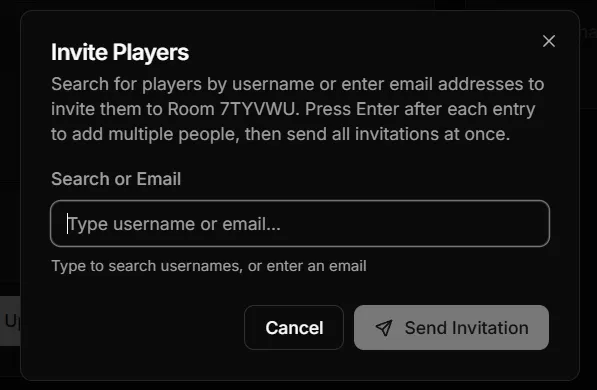
- Search by Username: Find registered players with autocomplete search, see online status
- Email Invitations: Send invites to anyone via email
- Batch Invitations: Add multiple people and send all invitations at once (press Enter after each entry)
- Any Player Can Invite: Not just the host, everyone in the room can invite others
Click “Invite Player” in any empty battle slot to get started.
January 23, 2026
Section titled “January 23, 2026”Performance Optimization
Section titled “Performance Optimization”Big under-the-hood upgrade to make battles feel smoother, especially on mobile:
- The map is now drawn in a more efficient way (fewer things to render each frame)
- Water animation was rewritten to be lighter on the CPU
- Removed a large chunk of old rendering/UI code that was no longer used (ca 1000 lines of code)
Result: better frame rates and lower memory usage. Feedback welcome!
January 20, 2026
Section titled “January 20, 2026”Development blog
Section titled “Development blog”Did you know that we have a development blog where we share our progress and insights into the development of TinyGenerals? And join our Discord Server to have more influence over the game development!
Social Login with Discord, Google & Steam
Section titled “Social Login with Discord, Google & Steam”First item from the January wishlist done: sign in faster and more securely with your existing accounts:
Quick Sign-In:
- One-Click Login: Use your Discord, Google, or Steam account instead of remembering another password
- Instant Registration: New players can create an account in seconds with social login
- Secure Authentication: Your credentials stay with the provider - we never see your password
Account Linking:
- Connect Multiple Accounts: Link Discord, Google, and Steam to the same TinyGenerals profile for flexible login options
- Settings Management: View and manage all connected accounts from your Settings page
- Safe Unlinking: Remove linked accounts anytime (as long as you have at least one way to sign in)
Smart Account Matching: If you already have a TinyGenerals account with the same verified email, your social login automatically connects to your existing profile - no duplicate accounts created!
Whether you prefer gaming platforms like Steam or productivity accounts like Google, you can now sign in the way that’s most convenient for you.
January 19, 2026
Section titled “January 19, 2026”Lobby Waiting Room & Unified Chat
Section titled “Lobby Waiting Room & Unified Chat”- Room lobbies now support an unlimited waiting room alongside the battle slots.
- Lobby chat now shows the standard welcome messages immediately, and also logs system messages when players join/leave or move between waiting room and battle slots.
- Lobby chat history is preserved into the battle, so you can see the full setup context after the match starts.
January 18, 2026
Section titled “January 18, 2026”Profile Customization
Section titled “Profile Customization”Personalize your account with custom avatars and username changes:
Avatar System:
- Avatar Presets: Choose from 13 hand-drawn medieval character portraits
- Custom Upload: Upload your own avatar image (PNG, JPEG, GIF, WebP)
- Maximum size: 2MB
- Recommended: Square images work best (1:1 aspect ratio)
- Suggested dimensions: 128×128 to 512×512 pixels
- Images are displayed at various sizes (28px to 128px) throughout the app
- Browser automatically scales your image to fit
- Clear Avatar: Remove your avatar to display initials instead
- Instant Updates: Avatar changes appear immediately in Header, Settings, Profile pages, and Player Rankings - no page refresh needed!
Username Changes:
- Availability Check: Real-time validation when typing new username
- Smart Suggestions: If taken, get alternative username suggestions
- Requirements: 3-50 characters, letters/numbers/underscores/hyphens only
Where Avatars Appear:
- User menu dropdown (top-right)
- Settings page
- Your profile page
- Public profile pages
- Player rankings/leaderboard
- Match player lists
All profile changes are saved instantly and synchronized across the entire app using a global event system.
January 15, 2026
Section titled “January 15, 2026”Graphics & Animations Enhancement
Section titled “Graphics & Animations Enhancement”Visual Polish:
- Zoom improvements: more fluid and more reliable zoom
- Deep Water Animation: Deep water tiles now feature a smooth 2-frame animation cycle combined with subtle perspective distortion effects
- Wave Simulation: Each deep water tile moves independently with randomized timing, creating natural, flowing wave patterns as if water is moving in depth
- Organic Movement: The combination of sprite animation and position/scale tweens creates a realistic undulation effect
This brings the ocean to life with more dynamic and immersive visuals!
User Settings Page
Section titled “User Settings Page”A new settings hub is now available in the user menu (top avatar button). It’s a first iteration with multiple placeholders
What Works Today:
- Theme Switcher (Light/Dark/System) - fully functional and persisted
- Account Status - View your Player ID badge and account info
- Quick Links - Profile, Players, Inbox, and Logout shortcuts
Coming Soon (Work in Progress): The settings page includes UI scaffolding for future features:
- Sound effects and notifications (backend integration pending)
- Battle reminders and notification frequency (awaiting notification service)
- Reduced motion and tooltip toggles (framework in place, not yet consumed by UI)
- Online status and match highlights toggles (server-side privacy controls planned)
All preferences are stored locally on your device. Server-side sync and full feature implementation coming in future releases.
Desktop & Mobile: Settings page is fully responsive and accessible from the user avatar in both desktop and mobile navigation menus.
January 13, 2026
Section titled “January 13, 2026”Unit Healing Visual Feedback
Section titled “Unit Healing Visual Feedback”Healing units now display beautiful particle effects:
Visual Polish:
- Healing Particles: When units heal, floating green “+” symbols appear and fade upward with varied animation styles
- Dynamic Effects: Each particle has unique behavior - some brighten and fade quickly, others stay dim and fade slowly, creating organic visual variety
- Multiple Particles: 3 particles appear per heal event, distributed around the unit for better visibility
- Smooth Animation: Particles smoothly rise and fade with individual lifetimes for a polished, non-repetitive feel
- Glow Circle: A green circle expands and fades around the healing unit, anchored to its position
Why This Matters:
- Clear visual feedback that your units are recovering
- Reinforces the importance of healing mechanics in strategic play
- Makes the game feel more polished and responsive to unit actions
January 10, 2026
Section titled “January 10, 2026”Room List Improvements
Section titled “Room List Improvements”The game browser has been completely redesigned for a better browsing experience:
Visual Enhancements:
- Map Previews: See what battlefield you’ll be playing on before joining with thumbnail previews in the room list
- Clearer Status Badges: Status now shows meaningful information like “Looking for Players (2/4)”, “Battle in Progress” with turn count, and winner names with victory icons
- Two-Row Layout: Each room uses a compact two-row design with primary info (map, room name, status) above and details (created time, time limits) below for easier scanning
- Modern Design: Refreshed with professional shadcn components for a polished, consistent look
- Smooth Loading: Skeleton placeholders appear while rooms load, eliminating jarring content shifts
Better Bot Identification:
- Personality Names: AI opponents now show their generated names (like “Lord Attila” or “Commander Zephyr”) instead of generic identifiers
- Bot Icons: AI opponents are clearly marked with robot icons in both host names and victory announcements, so you always know who’s human and who’s AI
These improvements make it much easier to find and join games at a glance!
January 5, 2026
Section titled “January 5, 2026”Mobile support
Section titled “Mobile support”I fixed panning and zooming-in/out and changed the sequence of display - now on mobile devices the map is what displays first. With some other fixes the game is now playable on mobile devices. Feedback welcome. It’s not yet optimised for mobile though - this will come in some short-term future, possibly as a mobile app.
Map Editor & Rendering Fixes
Section titled “Map Editor & Rendering Fixes”More is more: The world is bigger now. It’s 16384 tiles big now. I just introduced support for maps of 128x128 tiles. For comparison: In Civilization 1 the largest maps were 4000 tiles (80x50) and 128x128 was introduced around Civilization 4.
New transitional graphics: Maps are now displayed with hand-drawn (still placeholder) tiles. In the next days I will update the tiles with desired sizes. There is an upcoming refactor of some terrains like buildings and roads before I try to draw graphics for the game.
Pixel-Perfect Tiles on High-DPI Displays: Fixed rendering gaps that appeared on MacOS and high-resolution displays (especially ultrawide monitors). Tiles now render cleanly at all zoom levels without visible seams or artifacts (crossed-fingers)
Map Editor Loading Fixed: Existing maps now load correctly when editing. Previously, maps would sometimes appear empty (all water) due to a timing issue during load.
Water Animation Polish: Water tiles (Deep water) now have a subtle “breathing” animation effect that works smoothly with the new pixel-perfect rendering.
Future-Proofing for Naval & Air Units
Section titled “Future-Proofing for Naval & Air Units”The terrain system now includes support for future unit types: air and naval units.
This groundwork means naval and air gameplay can be added without breaking existing maps and gameplay.
Under the Hood
Section titled “Under the Hood”Consolidated shared code between the game and map editor into reusable modules. This means bug fixes and improvements now apply consistently to both, and future features will be easier to build.
January 4, 2026
Section titled “January 4, 2026”Shock Trooper Fix
Section titled “Shock Trooper Fix”Movement After Attack: Shock Troopers and similar units can now properly use their remaining movement points after attacking. Previously, these units would become inactive immediately after a move-and-attack action, even when they had movement points left. This fix makes hit-and-run tactics with mobile units work as intended.
Map Editor & Terrain System
Section titled “Map Editor & Terrain System”EMPTY Terrain Type: New boundary terrain for creating custom map shapes. EMPTY tiles are impassable and render as dark gray, allowing map creators to define non-rectangular play areas. Available in the map editor terrain palette and fully supported by the map generator. Have fun.
I made some more progress on the rulesets and themes, removing the old terrain system and replacing it with a more flexible system.
In-Game UI & Map Experience
Section titled “In-Game UI & Map Experience”Modernized Game UI: The in-game interface has been refreshed to match the newer look and feel used across the rest of the app, with cleaner cards, buttons, and status panels.
More Screen Space for the Map: The side panel is now collapsible on desktop, so you can hide it when you want to focus on the battlefield.
Better Mobile Layout: On smaller screens, the info panel is placed after the map, keeping the battlefield front-and-center.
Improved Zoom & Camera Behavior: The map now opens consistently (aligned from the top-left), keeps your last zoom level, and supports quick keyboard zoom presets for faster navigation.
Theme-Aligned Map Background: The map/canvas background is now tied to the active light/dark theme so it blends with the UI.
Visual Polish: Removed the heavy map border/shadow for a cleaner, more integrated look.
January 2, 2026
Section titled “January 2, 2026”Happy New Year!
Section titled “Happy New Year!”Getting into the new year, I’ve been working on a few updates to the game and an important bugfix blocking starting games. I also removed guest accounts and broke as much as possible of the graphics to replace everything with crappy placeholders. You’re welcome.
But honestly: one of the core foundations of TG for me is to make it possible to modify the game to your liking. I want to make it easy for modders and regular players to create their own maps, factions, and game modes. That’s why I’ve introduced rulesets and themes. Rulesets have been working for a while, themes are a new addition. More info at some later point.
🚨⚠️ Bugfixes
Section titled “🚨⚠️ Bugfixes”Fixed: Starting the game without faction selected would not spawn the units and the game would identify as no units present, ending the game with Draw but not closing the room. I guess I spent so much time making sure that the factions work and I’ve been debugging them for weeks, that I forgot to test the most basic functionality of an attempt to start the game withou the faction selected.
Account System Changes
Section titled “Account System Changes”Guest Accounts Removed: Automatic guest account creation has been disabled. You can now browse games and spectate matches anonymously without creating an account. To create or join rooms, you’ll need to register or provide your email for invited player access. After some consideration my initial idea of guest accounts wouldn’t make sense.
Visual Quality Improvements
Section titled “Visual Quality Improvements”Pixel-Perfect Tile Rendering: Tiles now render crisp(ish) and sharp(ish) at default zoom. Hex dimensions adjusted to match tile assets exactly (110×128px at 0.5× scale), eliminating blur from fractional scaling.
Improved Zoom Controls: Smoother zoom with consistent 10% steps. Press 0 to instantly reset to 1× zoom (pixel-perfect view). Zoom indicator in bottom-right shows current level and highlights green at 1×.
Configurable Themes & Tile Animations: Terrain animations (like water waves) now load from theme configuration files, making animation speed and frame count fully customizable. Modders can adjust FPS values to create anything from subtle ambient effects to dramatic animations.
UI Improvements
Section titled “UI Improvements”Join Room Page Redesign: The join room page now features a modern, centered layout optimized for pasting invite codes. Large input field with clear visual hierarchy makes it easier to join games quickly.
December 31, 2025
Section titled “December 31, 2025”💬 Battle Chat System Messages
Section titled “💬 Battle Chat System Messages”System messages now appear in battle chat for key game events (battle start, player eliminations, victories, surrenders). Player names are displayed in their faction colors and linked to profiles for registered players. Messages persist across refreshes as foundation for future player-to-player chat.
Visual Polish
Section titled “Visual Polish”Neutral buildings now display with a grey background and white text for clearer visual distinction from captured buildings, which show their owner’s color.
December 30, 2025
Section titled “December 30, 2025”AI Combat Behavior Improvements
Section titled “AI Combat Behavior Improvements”Fixed two critical AI decision-making bugs that caused bots to stop building units while hoarding gold:
-
Production under pressure: Bots now correctly prioritize building reinforcements when threatened, rather than holding position with existing units. When gold is available, the AI will vacate production buildings to spawn fresh units (2 units beats 1 static defender).
-
Strategic movement awareness: Fixed bug where bots would abandon production buildings during movement phase, then build units elsewhere, leaving critical bases exposed. Bots now stay on production buildings when they can afford to build, ensuring spawns happen before units reposition.
These fixes eliminate the “death spiral” behavior where threatened AI players would surrender with 800+ gold unspent.
Federation vs Alliance Units Rebalancing
Section titled “Federation vs Alliance Units Rebalancing”In January I’ll likely take a short break from new features to focus on AI performance improvements.
Holiday update:
-
Introducing Tiny Generals lore: Factions are designed to add strategic depth. Federation and Alliance are now sworn enemies with distinct unit compositions and tactical approaches.
-
Enhanced faction differentiation: Federation features swift units with strong attacks but weak defense and vulnerability to counterattacks. When facing Alliance, Federation must gain early economic advantage and finish before mid-game, as Alliance troops - while slower - have larger HP pools and superior durability. Alliance players should maintain defensive lines and survive early pressure until their industry can outproduce opponents.
-
Fixed Federation Shock Trooper: Restored the unit’s signature ability to retreat after attacking.
-
Fixed income display: UI now correctly shows actual income (frontend was displaying outdated calculations from before the economy backend migration).
December 25, 2025
Section titled “December 25, 2025”Community & Discovery Polish
Section titled “Community & Discovery Polish”A holiday update focused on community features and improved browsing:
- Enhanced Players Page: Advanced leaderboard with sorting and search to discover competitive opponents
- Public Map Browser: Browse community maps in the “All Maps” tab to find new designs and inspiration
- Improved Map Details: Better presentation of map information and statistics
- UI Refinements: Cleaner dialogs, better responsive design, and improved accessibility across pages
Keyboard Improvements:
- Q is now the primary unit cycle key (replacing SPACE brief-tap)
- SPACE now exclusively handles camera panning - no more accidental unit switches on touchpads!
- TAB remains available as an alternative unit cycle key
Game Settings:
- Fog of War now defaults to OFF when creating new rooms (easier for new players to learn)
December 20, 2025
Section titled “December 20, 2025”AI Tuning & Hotfixes
Section titled “AI Tuning & Hotfixes”A follow-up update to polish the new AI behaviors:
- Smarter Composition: Bots now maintain a better balance of units, ensuring artillery is always screened by a solid frontline of infantry and tanks.
- Combat Reliability: Fixed a critical bug where certain faction units (like Federation tanks) would deal no damage or fail to attack.
- Decisive Movement: Eliminated “hesitation” loops where AI units would move back and forth without committing to an attack.
- Match Stability: Fixed a setup issue that caused “ghost” units to appear in some bot matches.
More Competitive AI Bots (Beta)
Section titled “More Competitive AI Bots (Beta)”Bots now play with a more strategic, human-like game plan focused on winning via economy and territory, not just unit trades:
- Spatial awareness: Bots evaluate local positional advantage and favor fights/captures where they are strong, while avoiding overextending into enemy-dominated zones.
- Smarter movement: Units spread out to reduce congestion and approach targets from multiple adjacent tiles (lightweight flanking) instead of forming single conga lines.
- Aggression scaling: When ahead, bots commit more of their army and press advantages; when in contact, they bias production toward combat power to sustain the frontline.
- Closing out games: When an opponent is nearly defeated, bots prioritize taking that opponent’s production buildings to prevent recovery.
- Aggressive turn order: Bots now move and attack first, then build units last. This prevents bots from “camping on bases” under pressure - units aggressively move out to capture/attack, then fresh units are spawned to occupy the vacated production buildings at turn end.
- Front-line production priority: Bots build from all available production buildings (if economy allows), prioritizing bases closest to enemies. This ensures maximum pressure at the front while still defending rear infrastructure.
- Dynamic counter system: Bots now understand soft/hard attack mechanics - Artillery with high soft attack automatically targets Infantry (SOFT), Vehicles with high hard attack target other armored units (HARD). System adapts to any ruleset without hardcoding unit names.
- Artillery-first attack doctrine: Ranged units (artillery, range > 1) now attack before direct combat units. This allows artillery to damage/soften enemies before the frontline engages, maximizing tactical advantage.
- Safe artillery positioning: Artillery units stay behind friendly lines when possible, using allies as a screen. Exposed artillery (no friendly units ahead) receives major penalty, encouraging proper combined-arms tactics.
More testing needed: These AI changes are still being tuned. Expect occasional odd decisions in edge cases - feedback from real matches against humans is especially valuable.
December 19, 2025
Section titled “December 19, 2025”Facts and Factions 🎭
Section titled “Facts and Factions 🎭”Major new feature: Choose your faction and customize your army! The game now supports multiple factions with unique units, abilities, and playstyles.
Two Launch Factions:
-
Alliance - Well-rounded faction with balanced units and solid defensive capabilities
- Infantry → Militia (M) - Reliable defensive units
- Vehicle → Battle Tank (B) - Sturdy armor
- Artillery → Howitzer (H) - Long-range fire support
- Bonuses: Standard economy and balanced gameplay
-
Federation - Fast-moving faction excelling at aggressive early-game strategies
- Infantry → Trooper (T) - Mobile infantry
- Shock Trooper (S) - Exclusive unit! Elite infantry that can move after attacking (3 MP, 8 HP, 180g)
- Vehicle → Assault Tank (A) - Fast armor
- Artillery → Heavy Artillery (H) - Powerful bombardment
- Bonuses: -15% unit costs, +10% faster construction, +1 vision range, -10% income (high-risk/reward)
Faction Selection:
- Lobby Integration: Faction choice appears directly in player blocks alongside ready status
- Host Control: Hosts can set factions for AI bots to test different matchups
- Mirror Matches: Multiple players can choose the same faction
- Optional System: Factions can be left unselected for classic gameplay
Visual Differentiation:
- Unique Unit Names: Each faction’s units display with their faction-specific names (e.g., “Militia” vs “Trooper”)
- Distinct Symbols: Faction units show different letters on the map (M vs T for infantry)
- Proper Rendering: Units correctly display their owner’s faction customization
What’s Next:
More factions are coming! Each will bring unique mechanics, exclusive units, and distinct playstyles to master.
December 18, 2025
Section titled “December 18, 2025”AI Bot Improvements & Auto-Start
Section titled “AI Bot Improvements & Auto-Start”AI-only matches are now fully supported with automatic game start:
Bot vs Bot Battles:
- Auto-Start System: When all players in a room are bots and ready, the game starts automatically
- Full AI Matches: Create rooms with multiple bots to watch AI strategies compete
- Utility-AI Architecture: Bots use a utility-based decision system with threat analysis, territory scoring, and tactical prioritization
Bug Fixes:
- Fixed critical bug where bots couldn’t capture the last enemy building when only vehicles were nearby
- Bots now correctly identify enemies with 0 units but remaining territories as “critically weak”
- Enemy buildings are now properly prioritized for capture during elimination phase
⚠️ Performance Warning: Bot-only games execute turns rapidly in sequence. Please be reasonable when testing - avoid creating dozens of simultaneous bot matches or games with 8 bots on huge maps, as this can cause server performance issues until optimization is complete. We’re working on rate limiting and turn throttling!
December 15, 2025
Section titled “December 15, 2025”Room Lobby Enhancements
Section titled “Room Lobby Enhancements”The room lobby has been significantly improved with better visual clarity and host controls:
Visual Improvements:
- Player Color Indicators: Each player now displays a colored badge next to their name matching their in-game color
- Starting Positions Legend: Shows which player has which color and number, or “Waiting…” for empty slots
- Modern Icons: Replaced all emoji icons across the app with professional Tabler icons for a cleaner, more consistent look
- Light Theme Support: Added light mode styling that properly toggles with dark mode - both themes now look great
Host Powers:
- Drag & Drop Reordering: Hosts can drag players to reorder them, changing spawn position assignments
- Host Promotion: Hosts can transfer host status to another player via crown icon in player list
- Real-Time Updates: All changes broadcast instantly via WebSocket to all players
Map Viewing:
- View Full Map Button: Opens a large, zoomable modal dialog to inspect map details
- Zoom Controls: Integrated zoom in/out/reset buttons on both preview and full map view
Email Notifications
Section titled “Email Notifications”Stay informed when players join your rooms:
- Player Joined Alerts: Hosts receive email notifications when someone joins their room
- Quick Access: Emails include room name, code, and joining player’s username
- Background Delivery: Notifications sent asynchronously without affecting game performance
December 13, 2025
Section titled “December 13, 2025”Map Import/Export
Section titled “Map Import/Export”Share and backup your maps with JSON export/import:
- Export Anywhere: Download any visible map as JSON from maps list or editor
- Import Options: Load maps in maps list (creates new) or editor (replaces current with confirmation)
- Community Sharing: Export community maps to remix and customize
- Quick Backups: Export work-in-progress directly from editor
- Format: Human-readable JSON with all terrain, buildings, and spawn points
Perfect for sharing map designs, creating templates, or backing up your work!
December 11, 2025
Section titled “December 11, 2025”Streamlined Room Creation
Section titled “Streamlined Room Creation”Room creation is now instant with all configuration in the lobby:
What Changed:
- Direct Creation: “Create Room” button on homepage instantly creates a room and takes you to the lobby - no intermediate confirmation page
- Configure in Lobby: All settings (map, fog of war, time limits) are now set in the lobby instead of upfront
- Dynamic Map Selection: Host can change the map at any time before starting the game
- Flexible Settings: Time limits and other options can be adjusted right up until game start
- Real-Time Updates: All players see setting changes instantly via WebSocket
- Auto-Unready on Map Change: When host changes the map, all players are automatically unreadied to ensure everyone acknowledges the new map
Why This Matters:
- Faster Flow: Get your room code immediately and share it while you configure
- Less Pressure: No need to make all decisions upfront - experiment with settings as players join
- More Collaborative: Players can join and discuss settings before locking them in
- Better UX: Eliminated the redundant “Ready to play?” → “Yes, that’s why I clicked Create Room” step
Strategic Impact: The lobby is now the central hub for room setup, giving hosts full control while keeping the flow fast and intuitive. Perfect for quick pickup games or carefully planned matches with friends.
December 9, 2025
Section titled “December 9, 2025”Unit Healing System
Section titled “Unit Healing System”Units now passively heal when they remain inactive:
Healing Mechanics:
- +1 HP per turn for units that don’t move or attack
- Automatic: No player action required - just don’t use the unit
- Capped: Healing stops at maximum health
- Strategic Depth: Creates meaningful decisions between acting now or healing for later
Why this matters:
- Damaged units can recover instead of being replaced
- Defensive play is rewarded - hold positions while healing
- Economic efficiency - save gold by healing instead of building new units
- Tactical patience - sometimes waiting is the best move
- Resource management - veteran units become more valuable
Strategic Impact: Encourages creating defensive lines, pulling damaged units back to safety, and making careful decisions about when to engage vs. when to recover. Combined with the counter-attack system, this makes unit preservation more important than ever.
Combat & Economy Balance Overhaul
Section titled “Combat & Economy Balance Overhaul”Major rebalancing of Artillery and building income to improve strategic depth:
Artillery Rebalance:
- Role Change: Now specializes in destroying Infantry (anti-soft) instead of anti-armor
- SoftAttack: 10 → 11 (devastating vs Infantry’s 10 HP)
- HardAttack: 14 → 5 (weak vs armored Vehicles)
- TargetType: HARD → SOFT (Artillery itself is fragile equipment)
- Cost: 250 → 275 gold (reflects specialized role)
Why the change? Artillery was too strong against everything. Now it excels at its historical role (destroying infantry formations) but is vulnerable to armored counter-attacks. This creates rock-paper-scissors balance: Infantry → swarmed by → Artillery → hunted by → Vehicles → swarmed by → Infantry.
Building Income Reduction:
- Base: 200 → 100 gold/turn (-50%)
- HQ: 500 → 200 gold/turn (-60%)
- City: 100 → 50 gold/turn (-50%)
- Factory: 300 → 150 gold/turn (-50%)
Why the change? Previous income values allowed spamming units every turn with just one building. New values force strategic choices:
- With 1 Base (100g/turn): Takes 1.5 turns to build Infantry, 4 turns for Vehicles
- Capturing territory is now critical to sustaining army production
- Must choose between building units now vs saving for better units later
- Economic warfare and territory denial become viable strategies
AI Bot Improvements:
- Bot now better understands Artillery’s strengths and weaknesses
- Improved unit composition decisions and counter-building
- More strategic economic planning and spending
Gameplay Impact:
- Games last longer with more strategic depth (less unit spam)
- Territory control is now the key to victory (denying income = denying armies)
- Clear counter-play: spot enemy composition and build appropriate counters
- Economic comebacks possible: keep buildings, rebuild army
December 8, 2025
Section titled “December 8, 2025”Map Editor Improvements
Section titled “Map Editor Improvements”Complete redesign of the map editor with a modern, professional interface inspired by design tools like Photoshop and Figma:
New UI Layout:
- Horizontal Top Toolbar: All modes, tools, and actions in one row for quick access
- Narrow Left Sidebar: Context-sensitive palette that changes based on what you’re editing (terrain, buildings, or spawns)
- Maximum Canvas Space: Map editor now uses 75%+ of screen for better visibility, especially on larger displays
- Floating Panels: Map info and generator appear as overlays only when needed, keeping the workspace clean
- Responsive Design: Optimized for screens 1440p and larger, including ultrawide monitors
New Editing Tools:
- Flood Fill Tool: Press
Fto fill connected tiles of the same terrain type - great for quickly painting water bodies or land masses - Brush Size Options: Press
1,2, or3to paint with 1, 3, or 7 hex brushes - speed up terrain painting significantly - Auto-Save: Your work is automatically saved every 30 seconds to browser storage with restore prompt on reload
Random Map Generator: Generate playable maps with a single click featuring multiple map styles:
- Seed-based generation - share seeds to recreate exact maps
- 5 Map Styles: Archipelago, Continent, Lakes, Pangaea, and Channels for variety
- Configurable player count (2-8 players)
- Natural terrain using layered noise with randomized parameters
- Each player gets 2-3 Bases with spawn points
- Neutral Cities, Factories, and rare HQ scattered across the map
Spectator Tracking
Section titled “Spectator Tracking”Games now show who’s watching in real-time:
- Live Spectator Count: See how many people are viewing your match with a collapsible “Spectators (N)” panel
- Registered Viewers: Displays usernames of logged-in spectators with links to their profiles
- Anonymous Tracking: Shows count of anonymous viewers watching the game
- Real-Time Updates: Spectator list updates instantly via WebSocket as viewers join/leave
- Smart Filtering: Active players are excluded from the spectator list - only true watchers are shown
Enhanced Player Stats Panel
Section titled “Enhanced Player Stats Panel”The in-game player panel now displays comprehensive statistics using modern Tabler icons:
- Territory Count: See how many buildings each player controls
- Unit Count: Track army sizes at a glance
- Army Strength: Weighted metric showing combined military power (attack × health)
- ELO & Win Rate: Human players display their skill rating and win percentage
- Visual Consistency: Replaced emojis with professional icon set for cleaner UI
December 5, 2025
Section titled “December 5, 2025”Real-Time WebSocket Updates
Section titled “Real-Time WebSocket Updates”Game and room updates are now delivered instantly via WebSocket:
- Instant Opponent Moves: See enemy actions immediately instead of waiting 2-3 seconds
- Live Room Lobby: Player joins, ready status, and bot changes appear instantly
- Real-Time Feedback: All game events (units moving, attacking, building) propagate instantly to all players
- Better Multiplayer Experience: True real-time gameplay with no artificial delays
Artillery Visual Effects
Section titled “Artillery Visual Effects”Artillery attacks now have polished, centered animations with dynamic lighting:
- Fixed Sliding Effects: Muzzle flash and explosions now stay properly centered instead of sliding toward the lower-right corner
- Local Lighting: Added additive blend mode lighting effects that brighten surrounding tiles during:
- Muzzle Flash: Yellow-orange glow when the artillery fires
- Impact Explosion: Bright flash at the target location on impact
- Improved Visual Feedback: The lighting effects create a more dramatic and realistic feel for ranged combat
December 3, 2025
Section titled “December 3, 2025”Economy Rebalancing
Section titled “Economy Rebalancing”We’ve adjusted unit costs to reduce unit spam and make strategic choices more impactful:
- Infantry Cost Increased: 100 → 150 Gold
- Vehicle Cost Increased: 300 → 400 Gold
Why the change? Previously, owning just a Base and one City allowed producing 3 Infantry every turn, leading to endless swarms of units. With the new costs, players must choose between quantity (2 Infantry) or saving for quality (Vehicles), making every unit production decision more meaningful.
December 2, 2025
Section titled “December 2, 2025”Immediate Capture Progress
Section titled “Immediate Capture Progress”Territory capture now starts the moment your unit enters:
- Instant Feedback: Capture progress bar appears immediately when moving onto enemy or neutral buildings
- No More Waiting: Previously, capture only showed progress on the next turn - now it’s instant
Improved Construction UI
Section titled “Improved Construction UI”The unit build popup received a visual overhaul:
- Zoom-Independent: Build menu stays crisp and readable regardless of map zoom level
- Cleaner Layout: Redesigned card layout with icon, stats, and cost clearly separated
- Double-Click Prevention: Fixed bug where rapid clicking could build multiple units
Fog of War Fixes
Section titled “Fog of War Fixes”- True Darkness: Unexplored areas are now fully opaque - no more seeing terrain outlines or building markers through the fog
- Proper Discovery: Buildings and terrain only reveal when your units can actually see them
Economy System Enforcement
Section titled “Economy System Enforcement”Unit production now properly costs gold:
- Gold Validation: Building units deducts gold from your treasury - no more free armies!
- Construction Menu Prices: The build menu now shows unit costs and your current gold balance
- Affordability Check: Units you can’t afford are greyed out with a “Need X more gold” warning
- Keyboard Shortcuts: Pressing I or V to build will warn you if you lack funds
Technical Improvements
Section titled “Technical Improvements”- Centralized Economy: All economy rules (unit costs, income) now come from the ruleset system
- Extensible Design: Different game modes can define custom unit costs and economy rules
- Bot Parity: AI opponents follow the exact same economy rules as human players
Room Lobby Redesign
Section titled “Room Lobby Redesign”The room lobby now prioritizes player actions above the fold:
- Start Button at Top: Host’s “Start Game” button is now prominently displayed at the top
- Two-Column Layout: Players and actions on the left, map preview on the right
- Compact Header: Room name and code share a single line instead of large hero section
- Inline Controls: Add Bot button moved next to Players header for quick access
November 30, 2025
Section titled “November 30, 2025”UI Improvements
Section titled “UI Improvements”- Responsive Game Canvas: The game area now dynamically resizes to fill available screen space instead of a fixed 800×600 window
- Top Action Bar: New bar above the game showing your gold, income breakdown, turn number, and End Turn button for quicker access
- Compact Sidebar: Streamlined left panel with tighter spacing to maximize game visibility
Controls
Section titled “Controls”- Fixed Keyboard Shortcuts: SPACE (cycle units), ESC (deselect), and TAB now work reliably
- Space+Drag Panning: Hold SPACE and drag with left mouse button to pan the camera - alternative to middle-click for laptop users
Polish
Section titled “Polish”- Winner Display: Player list now shows “🏆 Winner” badge when game ends instead of confusing “Active” status
- Guest Banner: Guests now see a dismissible banner explaining account limitations (7-day session expiry, no ranking progress) with a link to register
November 29, 2025
Section titled “November 29, 2025”Player Elimination System
Section titled “Player Elimination System”The game now properly tracks when players are knocked out of the match:
- Clear Elimination: When you lose all your units AND all your production buildings (Bases, HQs, Factories), you’re officially eliminated from the game
- Visual Feedback: Eliminated players are now dimmed in the player list and marked with “• Eliminated” so everyone knows who’s still in the fight
- Clean Turn Order: Eliminated players are automatically skipped in turn order - no more waiting for someone who can’t play
- Proper Victory: The game correctly ends when only one player remains standing
Time Limit Improvements
Section titled “Time Limit Improvements”- Games with time limits now properly determine the winner when time runs out
- No more frozen “Time expired” screens - the game resolves and shows final rankings
- Rankings consider units, buildings, and gold when time expires
Smarter AI Opponents
Section titled “Smarter AI Opponents”AI opponents now play more strategically - they’re better at finishing games and won’t get stuck in endless stalemates anymore. Good for practice matches!
Coming Soon: Production Queues
Section titled “Coming Soon: Production Queues”Groundwork laid for a future production system where advanced units may take multiple turns to build. Stay tuned!
November 28, 2025
Section titled “November 28, 2025”Combat System Overhaul
Section titled “Combat System Overhaul”Major update to game combat rules for more strategic gameplay:
-
Move OR Attack: Units can now only perform one action per turn - either move or attack, not both. This makes positioning much more important and adds tactical depth similar to Civilization-style games.
-
Counter-Attack System: Combat is now more dynamic with counter-attacks:
- When a unit attacks, it deals damage to the defender
- If the defender survives, it counter-attacks and deals damage back to the attacker
- The attacker can potentially be killed by the counter-attack!
-
Health-Scaled Damage: Damaged units deal less damage. A unit at 50% health deals roughly 50% of its normal damage. This makes finishing off wounded units important.
Ambush Mechanics (Now Active!)
Section titled “Ambush Mechanics (Now Active!)”Ambush combat is now fully implemented when Fog of War is enabled:
- Hidden Enemy Attacks First: When you move into or next to a hidden enemy, they get a surprise attack before you can react
- +25% Terrain Bonus: Enemies ambushing from forests or mountains deal 25% extra damage
- Counter-Attack: If you survive the ambush, you automatically counter-attack
- Movement Stops: Your movement ends immediately when an ambush triggers
- Dramatic Animations: Visual effects show the ambush with attack lines, damage numbers, and terrain bonus indicators
Strategy Impact
Section titled “Strategy Impact”- Think before attacking - weak units attacking strong defenders might die
- Health management matters more - damaged units are less effective
- Positioning is key - you can’t reposition and attack in the same turn
- Focus fire is important - concentrate attacks to eliminate threats
- Scout carefully in fog of war - hidden enemies can ambush you!
November 27, 2025
Section titled “November 27, 2025”Features
Section titled “Features”-
Multi-Player Support (2-8 players): Rooms now support 2-8 players based on map configuration
- Maximum players determined automatically from map spawn points and building owners
- Room UI dynamically shows available player slots
- Games initialize with all joined players
-
Buildings & Territory System: Strategic buildings with ownership and capture mechanics
- Four building types: Base, HQ, City, Factory
- Each building type has different income and production capabilities
- Buildings can be player-owned or neutral
- Infantry can capture enemy and neutral buildings (2 turns)
-
Economy System: Gold and income added to gameplay
- Players start with 100 gold
- Buildings generate income at the start of each turn
- Use gold to produce new units at production buildings
- Infantry costs 100 gold, Vehicles cost 300 gold
-
Map Editor Improvements:
- New “Buildings” mode for placing buildings with ownership
- Draw/Erase tool toggle (keyboard: D/E)
- Support for up to 8 player spawn points
- Building ownership assignment (Neutral or Player 1-8)
- Improved cursor hit detection for accurate painting
Improvements
Section titled “Improvements”- Building Upgrades: Bases can be upgraded to HQ (costs 500 gold, takes 2 turns)
- Automatic Capture: Infantry automatically begin capturing when on enemy buildings
- Visual Feedback: Capture progress bars and upgrade indicators on buildings
November 26, 2025
Section titled “November 26, 2025”Features
Section titled “Features”- Player Leaderboard: New
/playerspage showing registered players ranked by ELO rating with stats (games played, wins, win rate). Accessible via “Players” link in header navigation. - AI Opponent: Play against an AI bot for solo practice and testing!
- Add AI when creating a room with “Add AI opponent” checkbox
- Add/remove AI from the room lobby
- AI gets a random fantasy name each game (e.g., “Lord Tyrion the Cunning”, “General Hannibal the Conqueror”)
- AI automatically takes its turn - moves units, attacks when possible, and ends turn
- Perfect for learning the game, testing maps, or quick solo sessions
- Single shared bot account prevents database clutter
Improvements
Section titled “Improvements”- Bot Display Names: AI opponents show fun, randomized names inspired by fantasy literature, mythology, and historical commanders
- Game State: Player info now includes usernames for better identification
November 21, 2025
Section titled “November 21, 2025”Features & Improvements
Section titled “Features & Improvements”- Overall Improvements: Better UI for battle room, map editor
- Improved Map Editor: Right click now doesn’t trigger the browser menu, middle mouse button allows to pan around
- Turns Played Tracking: Added tracking for the total number of turns played across all battles. The home page statistics are now displayed in a clean table format including this new metric.
- Debug Panel Collapsible: The in-game debug panel is now collapsible to reduce screen clutter. The state is persisted across sessions.
- API Request Deduplication: Implemented a caching system for stats and health check endpoints to reduce server load and prevent duplicate requests, especially in development mode.
- Frontend Package Updates: Updated various frontend dependencies.
- Game Stats Error Handling: Improved error handling for game statistics fetching.
November 20, 2025
Section titled “November 20, 2025”Features
Section titled “Features”- Surrender Feature: Players can now surrender games.
- Tile-by-Tile Movement: Unit movement is now visualized tile-by-tile.
- Game Statistics: Initial implementation of game statistics tracking.
Infrastructure
Section titled “Infrastructure”- Database Migration Cleanup: Cleaned up and consolidated database migrations.
- Deployment Script: Updates to deployment scripts using PM2.